
Tracking AI Features Across AEM (What’s actually included and what’s not)

Reading Viktor Lazar’s recent write-up on AI/assistant features around AEM and the broader “experience supply chain”, and before Adobe’s “Best of Adobe on AI in 2025” webinar, I decided to sanity-check the hype and look at what’s actually happening inside AEM today. I’ve decided to play hide & seek with AEM user-facing AI features and try to find them all.
Who should read this? Everyone is in love with AEM and AI. Just like the game of hide & seek, finding AI features is a thrilling mix of suspense, surprise, and strategy. It's a difficult game since AI could be anywhere. But in day-to-day work, it mostly shows up as help with writing, image generation, practical guidance, and information-seeking, while coding remains a smaller slice for most users.
Adobe, meanwhile, hasn’t “just started” with AI. It has been shipping ML-powered capabilities under Adobe Sensei since 2016 (including well-known AEM features like automated asset tagging), and that foundation makes the transition to today’s generative and agentic workflows feel more evolutionary than revolutionary.
So, where does that leave AEM right now? Which AI capabilities are real, productized, and usable today? What’s included in the license? How to recognize the real vs. fake AI? My approach was to make a list of actions through the Intelligent Content Supply Chain flow.
Intelligent Content Supply Chain flow:
1) Prepare & ingest
2) Create & generate
3) Manage & automate
4) Deliver & discover
5) Media intelligence (Dynamic Media)
6) Optimize & govern
Let’s start with the ingestion of content from other systems, ideation, and preparation for turning it into the full customer experience.
Experience catalyst: generative services for AI content preparation
First found, worst hide! This one was not hard to spot since it was revealed at Adobe Summit when it raised a lot of eyebrows. To get real value from GenAI in AEM (Adobe Experience Manager), your existing content has to be converted into a form that models can reliably understand and retrieve.
If you’re migrating to EDS, Experience Catalyst matters because it tackles that “content readiness” problem by converting content into embeddings and storing them in a vector database, so it becomes easier to discover, reuse, and activate across experiences. Content migration shouldn’t really last that long anymore.
Adobe highlights that large migrations often fail at the boring part of quality assurance, so Experience Catalyst includes automated checks to reduce the cost of manually reviewing hundreds or thousands of pages after migration, with:
- Style Critic Agent: performs multi-modal comparisons to flag regressions in style and layout across migrated pages.
- Content Critic Tool: detects textual differences between original and migrated pages at a large scale and produces similarity reports to pinpoint low-quality migrations.
Available depending on your AEM Sites entitlements.
Multi-modal form filling: let end-users fill forms in their preferred way
How many times have you found the right answer in a support chat, only to be sent to a separate form page and forced to retype the same information all over again? That handoff is where users drop off, and where I’ve found my second suspect.
With Multi-modal form filling, end-users can complete forms in the mode that suits them best, from traditional web fields, a conversational chat-style experience, images, or even scanned documents, so the experience stays flexible and low-friction.
For organizations running AEM Forms, this is an automation/orchestration capability designed to increase form completion rates, improve customer satisfaction, and reduce operational effort by letting a single form definition adapt across channels (including conversational use cases when paired with headless delivery patterns).
Available depending on your AEM Forms entitlements.
Smart tagging
Smart Tagging is a classic “DAM efficiency lever”. This AEM Assets classification/enhancement AI feature can reduce manual metadata work, speed up content operations, and make assets easier to find, especially in large libraries where governance depends on consistent tagging.
This is something that we used to have with Adobe Sensei before, but apparently, now it’s enhanced and has a confidence score, which helps librarians quickly review and keep only what’s relevant.
- Boosts asset discoverability and reuse by generating consistent metadata tags at scale, reducing reliance on manual tagging.
- For images and videos, it tags based on visual elements detected in the asset.
- For documents / text-based assets, it can extract readable text, index it, and use it to improve keyword-based search and retrieval (e.g., product info, brand names, descriptions found in the asset).
Available depending on your AEM Assets entitlements.
Content advisor
Historically, AEM already had a Micro-Frontend Asset Selector to browse/search the DAM, but discovery still depended heavily on how well someone organized and tagged content. Today, our suspect was hidden in the AI-assisted discovery that enables better metadata and search, plus a broader distribution layer like AEM Assets Content Hub, which makes approved assets easy to find and share via an intuitive portal.
- Faster asset discovery using improved metadata and search. AI-generated metadata improves the ability to search, categorize, and recommend assets, and supports semantic + lexical search approaches.
- Content Hub is built around distributing brand-approved assets (only approved assets become available in the hub), which reduces off-brand reuse and “random file sharing”, making the governance easier.
- Beyond AEM UIs, Adobe provides integration patterns such as the Asset Selector and the AEM Assets Sidekick plugin for document-based authoring (e.g., Microsoft Word / Google Docs), reducing the “download/upload/copy-paste” loop and enabling activation in the tools people actually use.
Available depending on your AEM Assets entitlements.
2. Create & Generate Content
Experience generation for forms
Experience Generation for Forms is about reducing the “time-to-first-working-form” by letting teams start with intent instead of wiring. In Adobe’s AEM Forms Early Access capabilities, this shows up as generative features that can create and reshape Adaptive Forms using prompts, including form generation, panel/section generation, and switching layouts (for example, to wizard-style flows) to build better forms faster and reduce drop-offs.
Available depending on your AEM Forms entitlements.
Variations generation
Generate Variations helps authors create on-brand content alternatives in seconds, so teams can personalize and test messaging without rewriting from scratch. It generates copy in context (right inside the experience where it will be published), uses brand and channel-aware prompting, and works across Universal Editor and Document-Based Authoring in EDS so authors stay in their preferred workflow.
In short: faster campaign cycles, higher content/testing velocity, and improved engagement without adding headcount.
Available depending on your AEM Sites entitlements.
Experience blocks
Experience Blocks are best thought of as reusable, governed units of experience, not just “content modules.” In Adobe’s Content Supply Chain narrative, the point is to package content + context + compliance so teams can activate the same approved building blocks across channels (and measure what works), instead of rebuilding similar experiences again and again.
- Composable by design, governed by default: built for reuse without losing brand control.
- Cross-channel ready: intended to be activation-ready across touchpoints (web, email, paid, etc.).
- Built for scale (with insights): designed to close the loop so you can see where blocks are used and how they perform — enabling continuous optimization.
It can be somewhat confusing since it’s similar to experience fragments, but the AI element makes the difference. Experience Fragments are the AEM building block for reusing experiences, while Experience Blocks are the content-supply-chain “package” for governed reuse and activation across the ecosystem (often implemented using AEM/EDS building blocks under the hood).
Experience Fragments = Content + Layout
Experience Blocks = Content + Context + Approval
Available depending on your AEM Sites entitlements.

Integration with Adobe Express and Firefly
The Integration with Adobe Express and Firefly is one of the most practical “content supply chain” wins in AEM: it lets more people create on-brand collateral (web, social, flyers, banners, simple animations) using Adobe Express while keeping AEM Assets / Content Hub as the source of truth. With the native integration, users can open approved assets from AEM Assets inside Express, edit them, and save new or updated versions back into AEM, so reuse and governance don’t break when creation scales to non-designers.
Because Firefly's generative AI capabilities are available in Adobe Express, teams can also repurpose and personalize content faster (e.g., create variations, resize/reformat, generate new creative elements), without starting from scratch.
Available depending on your AEM Assets and Creative Cloud entitlements.
Experience hub: UI & automation
Experience Hub: UI & Automation is where AI shows up in the most “everyday” way, embedded directly into the AEM interface to reduce clicks, reduce context switching, and keep authors moving. You’ll notice it in small but high-impact touches like quick actions, recents (so AEM remembers what you worked on), and personalized navigation that surfaces the most relevant content, tools, and tasks. As Adobe expands assistant and automation patterns across the UI, this becomes the “control plane” where AI support feels native rather than bolted on.
Available depending on your AEM Sites entitlements.
AI Assistant: Chatbot for product support & product knowledge
Adobe’s AI Assistant in AEM brings a conversational help layer directly into the AEM UI (Cloud Manager and author), so users can get answers without leaving their workflow. Under the hood, Adobe is aligning these assistant experiences with the agentic layer in AEP (Adobe Experience Platform). Two practical agent examples to call out:
- Product Support Agent – can help troubleshoot and (for authorized users/admins) create a support case with contextual details from the session, reducing ticket back-and-forth.
- Product Knowledge (capability) – retrieves and summarizes relevant Adobe documentation to answer “how do I…?” product questions inside AEM.
Available depending on your AEM Sites entitlements.
AI Search
Meaning-based search goes beyond keywords by interpreting intent and context. It returns more relevant results for complex queries, even when exact metadata isn’t present, and suggests context-aware filters using ML/NLP to quickly narrow down results.
Available depending on your AEM Sites entitlements.
AI Answers
AI Answers is currently in beta (called out in the AEM Sites 2025.11.0 release notes), and it’s easy to confuse it with AI Assistant, but the audience is different. While AI Assistant supports internal users inside AEM, AI Answers is customer-facing, designed for site visitors.
It introduces a new way for people to interact with your content by using RAG (Retrieval-Augmented Generation) to ground responses in your AEM-managed content, helping deliver answers that are relevant and more brand-consistent directly within the experience.
Available depending on your AEM Sites entitlements.
Edge Delivery Services
EDS delivers high-impact digital experiences with extreme speed, agility, and scale, helping teams launch faster, increase content velocity, and reduce total cost of ownership.
And it’s worth saying it plainly: websites on EDS aren’t just fast, they feel instant. That “instant” feel is often the difference between a good website and a premium experience. EDS lets authors publish from familiar tools like Microsoft Word or Google Docs, or use a visual editor like Universal Editor.
If you’re making a website with EDS and your lighthouse performance, accessibility, best practices, and SEO score is less than 100, double-think before blaming the technology. Its performance-first architecture boosts conversions with optimized boilerplate, phased rendering, persistent caching, and real-user monitoring.
Built-in experimentation makes it easy to test and optimize content quickly, so teams can learn what drives engagement and improve outcomes. Make your content stand out in that AI-overview section.
Available depending on your AEM Sites entitlements.
Future-proof Headless CMS for CS
AEM Sites’ headless CMS for Content Supply Chain positions AEM as a faster, smarter, and more scalable platform for structured content delivery across channels.
It builds on Content Fragments, with streamlined tooling like the Content Fragment Editor, a faster Content Fragment Inventory UI, and an improved Content Fragment Model Editor for easier schema definition. The result is quicker creation and management of structured content, with less operational friction. For reuse at scale, AEM still leverages proven capabilities like MSM (Multi-Site Management) and Launches to roll out and schedule content efficiently across markets.
On the architecture side, Adobe highlights OpenAPI-based management/delivery and a new eventing model to support more dynamic, real-time experiences. And importantly, AEM’s reputation as ‘not natively headless’ is a thing of the past; headless is now a first-class, productized way to build with AEM.
Available depending on your AEM Sites entitlements.
Dynamic Media – Image Smart Crop
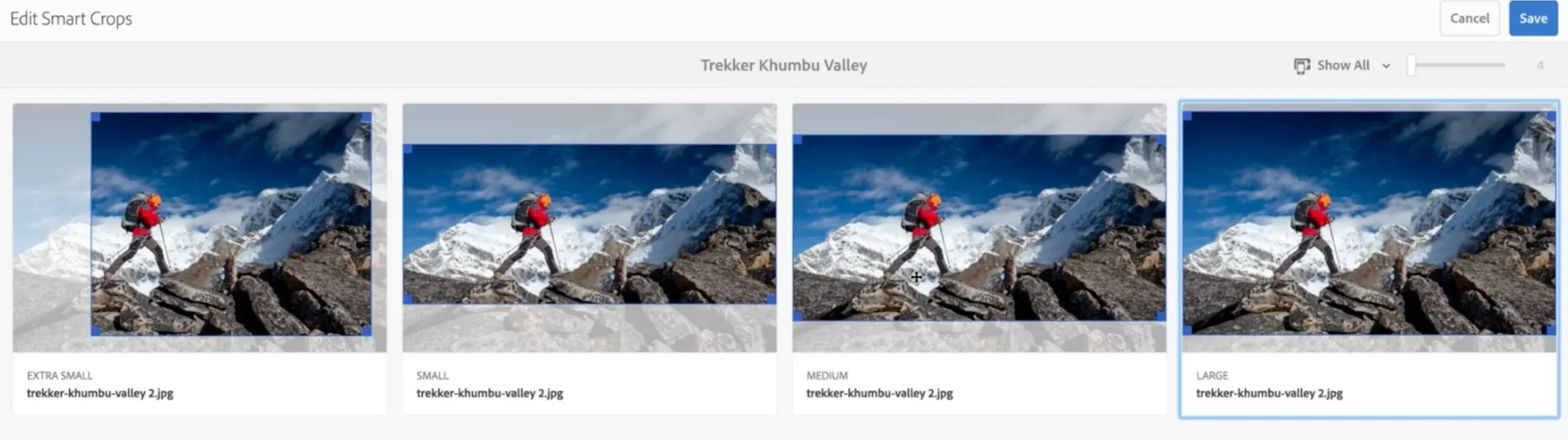
Dynamic Media – Image Smart Crop uses Adobe Sensei to automate bulk cropping by detecting the focal point and generating smart crops that preserve the “area of interest” across different aspect ratios and screen sizes. It can be applied to individual assets or entire folders, making it practical at the DAM scale.
This is especially valuable when teams need many renditions (hero, card, thumbnail, banners) without manual cropping work.
Available depending on your AEM Assets and Dynamic Media entitlements.
Smart Crop for Video
Similar to images, Smart Crop for Video uses Adobe Sensei to automatically detect the point of interest in a video and generate crops that keep the subject in frame. It lets you capture once in a single aspect ratio, then create multiple ratios for different placements (web, social, mobile, etc.) without manual editing.
Because the point-of-interest is tracked over time, the crop stays visually “right” even as the scene moves—so videos look better on every screen size.
Available depending on your AEM Assets and Dynamic Media entitlements.

AI-Powered captions for video with dynamic media
AI-Powered Captions for Video with Dynamic Media automatically transcribes a video’s audio and generates captions, making accessibility a “default” step instead of a manual project. Captions are created directly in AEM after upload, can be reviewed before publishing, and support global distribution by enabling translation workflows. Adobe positions it as supporting more than 60 languages, which dramatically reduces the time teams spend on transcription and caption management.
Available depending on your AEM Assets and Dynamic Media entitlements.
Dynamic media smart imaging
Dynamic Media Smart Imaging is Adobe’s “serve-the-best-image” layer for AEM: it automatically delivers the most efficient rendition for each device/browser to improve speed and reduce bandwidth. Just with the correct image format (JPEG vs. WEBP vs. AVIF), you can gain faster page loads, better Core Web Vitals/SEO, and lower delivery costs at scale.
To catch them all, we need to expand our view outside of what’s delivered with the standard AEM license. At the time of writing this article, everything in this category required a separate license (or add-on) from AEM.
Sites Optimizer
AEM Sites Optimizer is an AI-driven layer for marketers to continuously improve traffic acquisition, engagement, and conversion on AEM sites, without needing deep technical help. It follows a simple loop:
- Auto Identify: continuously monitors site health and performance to spot opportunities (e.g., SEO issues, broken backlinks, missing metadata, low CTR pages).
- Auto Suggest: proposes fixes using models trained on AEM content and performance signals.
- Auto Optimize: can apply recommended changes on the marketer’s behalf, turning insights into action with minimal effort.
In short, it’s “analytics + recommendations + execution” aimed at keeping sites optimized all the time. Nothing we haven’t seen already, but this time, instead of using 5 different tools, you have everything in one dashboard.
LLM Optimizer
At the end, the unusual suspect. Adobe LLM Optimizer goes outside of the standard marketing toolstack, but with a reason. Adobe once again shows how to be at the forefront of innovation with the tool that’s positioned as a way for brands to stay visible, accurate, and influential in the era of AI-native search and discovery, where people increasingly start research in chatbots and AI assistants, not just Google.
It focuses on three things: owning your presence in AI results, connecting AI-driven traffic to measurable outcomes (engagement/revenue), and turning insights into action with prescriptive recommendations and streamlined deployment.
Customers can get to the information quicker than ever, without any need to do the research themselves. Google “What’s the closest ATM without a foreign currency fee?” and let me know how many relevant articles you get and how much time until you find the information you need. Now try the same with any AI chatbot.
One key advantage: Adobe LLM Optimizer isn’t limited to AEM sites; it can evaluate and optimize non-AEM pages as well.
If you’d like to set up a trial account so you can see how visible your website is in AI chatbots and AI-driven search results, feel free to contact me.
What do you think, did I find them all? I hope you’ve enjoyed playing this game with me. However, I must admit that I’ve peeked by using release notes, sandboxes, and of course, AI chatbots to discover all AI features AEM has to offer.
Recommended Reads
Cyber64 is proud to announce that we have achieved Adobe Gold Solution Partner status under the Adobe Digital Experience Partner Program. It is a program that brings together the best Adobe partners that help clients innovate, implement, and achieve growth utilizing Adobe solutions.
AEM Guides makes documentation simple, organized and easy to manage. Teams can collaborate in real time, use standard templates and track approvals all in one place.
Who should read this? Everyone is in love with AEM and AI. Just like the game of hide & seek, finding AI features is a thrilling mix of suspense, surprise, and strategy.
We’re proud to share that Cyber64 has been ranked #9 on Clutch’s 2025 list of the 100 fastest-growing companies globally!
This prestigious recognition is based entirely on verified financial growth over the past few years and highlights the companies making the biggest impact across industries.
Cyber64 has been awarded the Zlatna Kuna in the Small Business category for its exceptional 2024 results. Recognized as a leading digital agency, Cyber64 helps global corporate clients streamline content creation and distribution through advanced Adobe tools, driving digital transformation, automation, and measurable business growth.
Ready to take the next step?
